
New employee editor in gSignature – faster and easier team data management
November 12, 2025

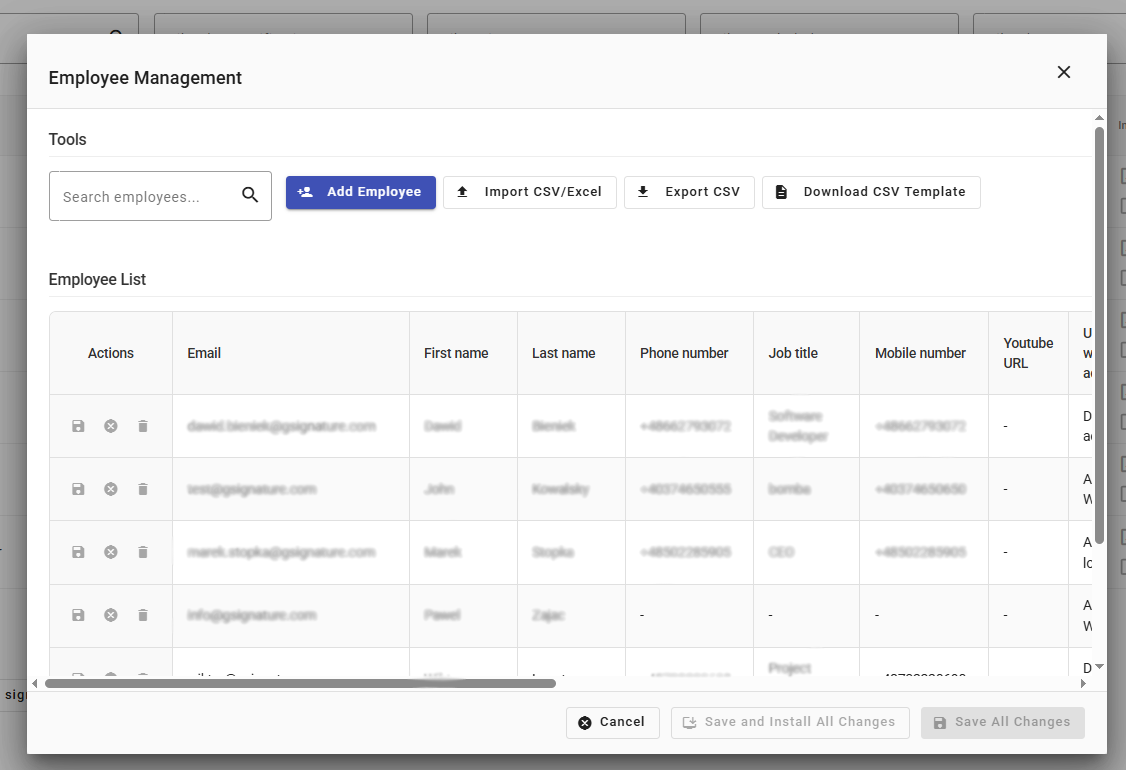
Key features of the new editor
1. Data import and export
Administrators can now import employee databases from CSV or Excel files, which makes it easy to quickly load large data sets—for example, when setting up an account for the first time or after updating the employee list. You can also export data from gSignature to a CSV file at any time to archive information or use it in other HR systems.
2. Editing multiple records simultaneously
The new editor allows you to directly edit the data of multiple employees in a single view. HR or administration staff can independently update information such as first name, last name, position, phone number, or email address—without having to access individual user profiles.
This allows changes to the organizational structure to be made instantly, and email signatures throughout the company are automatically updated.
3. Quick search and filtering
The built-in search engine allows you to instantly find a specific employee or group of users, and filters make it easier to work with large teams — e.g., by department, role, domain, or activity status.
This solution significantly speeds up the work of maintaining professional e-mail signatures in large organizations.
Why is this important?
The new editor in the Employees tab is a tool that eliminates time-consuming administrative processes and increases team autonomy. Instead of sending spreadsheets or requesting technical support, the HR department can now, in just a few minutes:
- add new employees,
- update data in existing records,
- synchronize changes with email signature templates.
Everything happens in real time, and the data automatically syncs with active templates in gSignature, ensuring that every professional email signature remains up to date, consistent, and compliant with the company's brand book.
Effect
The new editor is another step towards full automation of email signature management. It combines ease of use with the power of centralized data management — saving time and minimizing human error.
💡 The new employee editor is now available in the Employees tab in the gSignature admin panel.
Didn't find a solution or answer to your question?
See here for more help or send us a message. Write which topic you are interested in or what issue you need help with.